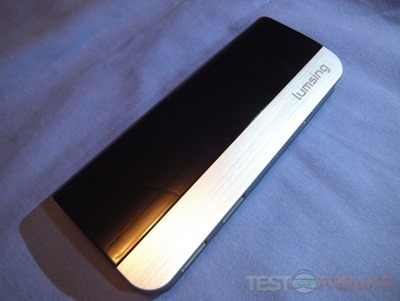
Lumsing 10400mah Portable Power Bank Review

lum6_thumb

New review by me..

Link:  http://blog.testfreaks.com/review/review-of-lumsing-10400mah-portable-power-bank/

Quote:
” More power is needed for our mobile devices and today I have another portable battery pack for review from our friends over at Lumsing. Today I have a 10400mAh portable battery pack or power bank that features two USB ports that can charge tablets or phones or both at the same time or virtually anything else that charges via USB. The 10400mAh capacity of the battery will allow you to charge you devices multiple times so it’s a great power pack for just a day or even a weekend on the go and it will make sure you’ve got power when you need it most. Read on to learn more.”

Archos Announces Android ArcBook Coming for $170

ArcBook

I normally don’t post press releases over here but this one I think is an exception. Archos just announced the ArcBook which is running Android and it has a 10.1inch touchscreen, full keyboard and access to Google Play and it’s only $170..

Here’s the PR:


ARCHOS, a pioneer in Android™ devices, unveils the ARCHOS ArcBook, the first Android netbook with touchscreen designed with productivity and value in mind.  The ARCHOS ArcBook offers students and mobile professionals the convenience of a keyboard and trackpad and the superb user-experience and mobility of an Android tablet at a budget-friendly price.

Productivity-focused software

Available for $169.99, the ARCHOS ArcBook is the ultimate value-packed, on-the-go productivity machine running Android 4.2 Jelly Bean.  It is preinstalled with Office suite Pro 6, making creating and editing Word, Excel, PowerPoint and PDF files easy.

It allows access to all Google services, including the Google Play application store, Google Chrome web browser and other Google Apps such as YouTube, Gmail, Translate and more. It also comes with 15 GB of free Google Drive cloud storage, enough to store a plethora of documents.

Feature-rich hardware

The ARCHOS ArcBook has a 10.1-inch touchscreen with a full keyboard and integrated Android shortcuts keys to maximize typing speed.  Connectivity and expandability have been boosted thanks to a full USB host port and it has enough battery power for more than 10 hours of continuous use.

“ARCHOS ArcBook combines a consumer-friendly tablet experience with the productivity of a netbook,” says Loïc Poirier, CEO of ARCHOS.  “The ARCHOS ArcBook furthers our commitment to providing feature-rich, consumer-friendly technology at an affordable price.”

For more information about ARCHOS ArcBook or the entire selection of smartphones, tablets and connected objects, visit us at www.ARCHOS.com
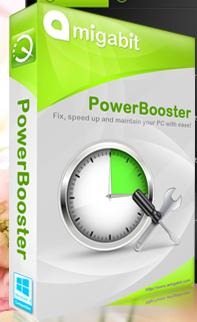
Freebie: Amigabit PowerBooster PC Tune-up Software

powerbooster

Ok, so I’ve never used this or tried it but I thought I’d share it with you as it’s free.

Amigabit is giving away their PC tune up software called PowerBooster until may 15th.


Giveaway: Amigabit PowerBooster
Help fix system errors, and tune up computer with only one click; mothers can handle computer problems easily by themselves.
– Fix frustrating errors, crashes and freezes in minutes
– Protect your personal data from Internet thieves smartly
– Analyze and defragment hard disk automatically
– Eradicate registry errors and clean up inconsistencies

Link: http://www.amigabit.com/promotion/

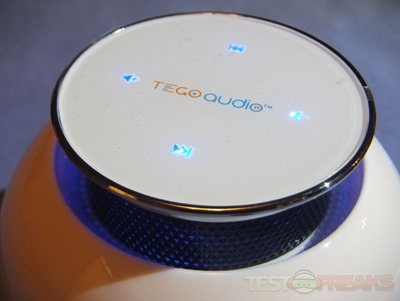
Tego Audio Cera Bluetooth Speaker Review

cera12_thumb

Yep.. new review by me…

Link: http://blog.testfreaks.com/review/review-of-tego-audio-cera-bluetooth-speaker/

Quote:
“Up for review today I have the Cera wireless Bluetooth speaker from Tego Audio. This little speaker is orb shaped and it has what Tego calls an expanding sound chamber that provides omnidirectional sound so it doesn’t matter where you put it the sound is the same. The Cera features multimedia touch controls right on the top which light up blue when powered on. The Cera surprised me by just how good it sounded, especially since it only has one speaker inside of it, the sound is clear and loud. Read on to learn more…”

How To Easily Disable Aero Shake and Snap in Windows 7

aeroshake

Aero Shake and Snap are enabled by default in Windows 7 and I find them annoying personally. Many times I’ve grabbed a window to move and moved it too fast and Windows thought I was shaking so all of my open windows disappeared. Sure I could just bring them back up, but for whatever reason Aero Shake kills my CCTV security program. I run four monitors, three across the bottom that are 23” – 27” – 23” and then I have a 19” up and to the right above them for email, CCTV and weather and clock/timer and whatever else. Aero Shake kills my CCTV program and it’s just annoying so I wanted to stop it from doing that.

Aero Snap is annoying as well as it sometimes activates when you don’t want it to. Both Shake and Snap are enabled by default in Windows 7 if you’re using Aero.

I went looking for a solution and found ways to disable it via the registry but there is a much easier way. Messing with the registry can be hassle and dangerous to your system if you do it wrong. There are places you could just download the registry fix, but downloading things isn’t exactly safe either so I thought there had to be an easier way.